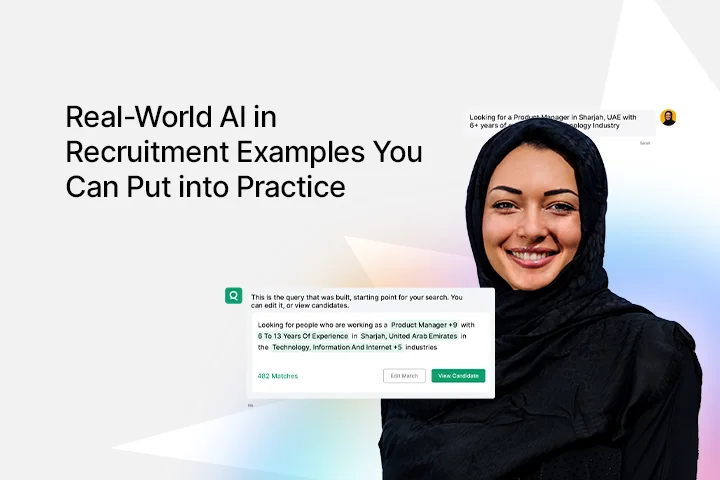
Real-World AI in Recruitment Examples You Can Put into Practice
Real-World AI in Recruitment Examples You Can Put into Practice

What Does AI in Recruitment Actually Look Like?
AI in recruitment covers any use of artificial intelligence to automate, augment, or improve hiring tasks, from sourcing and screening to interview scheduling, candidate communication, and predictive analytics. It ranges from simple chatbot tools that answer candidate FAQs to fully agentic systems that run multi-step sourcing and outreach workflows without human input at every stage.
The most important thing to understand about AI in recruitment is that it is not one tool. It is a category of capabilities that can be applied at different stages of the hiring funnel, at different levels of automation, depending on your team's needs and readiness.
AI in Recruitment vs. AI in HR: Key Difference
AI in recruitment focuses specifically on the hiring funnel, from sourcing and screening through to offer acceptance. AI in HR covers the broader employee lifecycle, including onboarding, performance management, learning and development, and retention.
Many platforms now cover both. But recruitment-specific AI optimizes for speed and candidate quality at the point of hire, which is where most teams need the most help first.
Real-World Examples of AI in Recruitment by Use Case
These are not theoretical possibilities. These are examples of AI in recruitment that organizations are using right now, with practical steps to help you implement each one.
Example 1: AI Resume Screening
Unilever receives over 1.8 million applications annually for approximately 30,000 positions worldwide. To handle that volume without expanding their recruiting team, Unilever built a four-stage AI-assisted process: online application, Pymetrics games-based assessment, HireVue AI video interview, and a final assessment center for shortlisted candidates.
The result was a dramatic reduction in early-stage recruiter hours and a measurable improvement in candidate diversity, as the AI evaluated skills and potential rather than university names and previous employer brands.
How to put this into practice:
- Choose one high-volume role type where manual screening is your biggest bottleneck
- Define your screening criteria clearly before configuring any AI tool
- Review AI-generated shortlists manually for the first 30 days to validate the model's accuracy
- Expand to additional roles only after you can confirm shortlist quality matches or exceeds manual review
Example 2: AI Candidate Sourcing
AI sourcing tools do not rely on Boolean keyword searches or candidates who happen to be actively applying. They scan databases of hundreds of millions of profiles, evaluate career trajectory, skill depth, and role relevance in context, and surface candidates that keyword-dependent searches consistently miss.
Companies using AI sourcing tools find 75% more qualified candidates per position compared to traditional methods, according to Indeed data. AI sourcing tools have also expanded average candidate pools by 340% while reducing sourcing time by 67%. For high-volume hiring or hard-to-fill technical roles, this is where AI delivers the fastest measurable ROI.
How to put this into practice:
- Identify the role type where sourcing consistently takes the most recruiter hours
- Run AI sourcing alongside your existing method for one full hiring cycle
- Compare shortlist quality, time-to-shortlist, and offer acceptance rates between both approaches
- Use the data to justify broader rollout or refine your criteria
Example 3: AI Interview Scheduling
Interview scheduling coordination accounts for 15 to 20% of most recruiters' working hours. Every email chain, calendar conflict, and reschedule request adds invisible cost to every hire. AI scheduling tools eliminate that entirely by syncing interviewer and candidate calendars, offering available slots, booking the interview, and sending automated reminders without any back-and-forth required.
Teams using AI scheduling report coordination time cut by 80% or more per hire. For roles with three or more interview rounds involving multiple stakeholders, the time savings compound quickly. See the best AI recruiting platforms for platforms that include scheduling automation as part of a broader workflow.
How to put this into practice:
- Implement AI scheduling first on roles with the most interview rounds
- Measure recruiter hours spent on scheduling coordination before and after for 30 days
- Use the time saved as your ROI evidence when presenting the investment to leadership
Example 4: AI Chatbots for Candidate Communication
Candidates consistently report that poor communication during the hiring process is one of their top frustrations. AI chatbots address this by handling FAQs, application status updates, initial screening questions, and interview logistics instantly, 24 hours a day, seven days a week.
A candidate who applies at 11pm on a Sunday receives an acknowledgment and next steps immediately rather than waiting until Monday morning. That responsiveness directly improves candidate experience and reduces application drop-off rates at the top of the funnel.
AI chatbots also conduct initial screening conversations, asking role-specific qualifying questions and routing candidates based on their responses. This removes a significant volume of low-fit applications from recruiter queues before any human time is spent. For a deeper look at how chatbots are changing hiring, see how AI chatbots are transforming the hiring process.
How to put this into practice:
- Identify the top 10 questions candidates ask your team most frequently
- Deploy a chatbot on your careers page to handle those questions automatically
- Track candidate drop-off rates and average response times before and after deployment
- Add screening qualification questions only after the basic FAQ function is working well
Example 5: AI Video Interviews
AI video interview tools allow candidates to record responses to structured questions on their own schedule. The AI analyzes the content of answers, communication clarity, and structured thinking to score candidates against role-specific criteria before a human recruiter reviews the shortlist.
Companies using AI video screening consistently report reducing time from application to first decision from weeks to hours. One-way video interviews also remove scheduling friction for candidates in different time zones, which expands the accessible talent pool for US companies hiring remotely. For a full breakdown of the top tools, see AI video interview tools for recruiters.
How to put this into practice:
- Use AI video interviews for first-round screening on high-volume roles only
- Build structured question sets tied to specific role competencies before launching
- Keep all finalist-stage interviews as live human conversations
- Review AI scoring against your own assessments for the first cohort to calibrate accuracy
Example 6: Predictive Analytics for Quality of Hire
Predictive analytics tools use historical hiring and performance data to estimate how likely a candidate is to succeed in a role before the hire is made. Rather than relying on gut feel or resume credentials alone, these systems surface patterns across thousands of past hires to identify which signals correlate most strongly with long-term performance and retention.
75% of organizations now use AI to predict candidate availability and interest, according to Second Talent. As these systems are trained on better data, their accuracy improves. The practical caveat: predictive tools are only as good as the quality of hire data you feed them. Teams that have not yet established consistent quality of hire tracking will get limited value from predictive analytics until that baseline exists.
How to put this into practice:
- Track quality of hire data consistently for at least six months before evaluating predictive tools
- When evaluating a predictive tool, test its predictions against your actual outcomes data from the past year
- Never use predictive scores as the sole basis for a hiring decision
- Treat predictions as one input alongside structured interview data and manager assessment
Example 7: AI Job Description Writing
Poorly written job descriptions attract the wrong candidates, use exclusionary language, and misrepresent the actual role. AI tools generate structured, role-specific job descriptions in minutes, flag gendered or exclusionary language automatically, and improve the quality of inbound applications by setting clearer expectations from the start.
Use the job description generator to create tailored job descriptions that attract qualified candidates and reduce mismatched applications. Always have a hiring manager review the output for accuracy before publishing.
How to put this into practice:
- Use AI to generate a first draft based on role title, team context, and key responsibilities
- Have the hiring manager review and edit for accuracy before posting
- A/B test AI-generated descriptions against your previous versions and compare application quality
Examples of AI in HR Beyond Recruitment
AI in recruitment is the most widely adopted application of AI in the HR function, but it connects to a broader set of capabilities across the employee lifecycle.
AI in onboarding personalizes new hire learning paths based on role, experience level, and knowledge gaps identified during the hiring process. AI in performance management identifies engagement signals and productivity patterns before they surface in formal reviews. AI in retention flags employees showing behavioral signals associated with flight risk, giving managers a window to intervene before a resignation arrives.
These capabilities build on the data generated during recruitment. The quality of hire data, candidate assessments, and screening outcomes from your AI recruiting process become the foundation for smarter people decisions after the hire. For more on how AI is reshaping the full hiring function, see how AI is transforming hiring and US hiring trends 2026.
How to Put AI in Recruitment into Practice: Where to Start
Knowing the examples is not enough. The teams that get real results from AI in recruitment start narrow, measure everything, and expand based on data. Here is how.
Step 1: Identify Your Biggest Time Drain
Audit where your recruiters spend the most hours each week. For most US recruiting teams, sourcing accounts for 40 to 50% of time and scheduling coordination accounts for another 15 to 20%. Those two areas represent the fastest path to measurable ROI from AI.
Step 2: Pick One Use Case First
Do not deploy AI across the entire hiring funnel simultaneously. Pick the single use case that addresses your highest time cost and carries the lowest risk. For most teams, sourcing is the right starting point. For teams drowning in inbound applications, AI screening is the better first move.
Step 3: Set Baseline Metrics Before You Start
Document your current time-to-shortlist, time-to-fill, cost-per-hire, and shortlist quality score before deploying any AI tool. These are your before numbers. Without them, you cannot measure ROI or make a credible case for expanding the investment.
Step 4: Pilot on One Role Type for 30 Days
Run AI alongside your existing process for a single role type. Compare shortlist quality, time-to-shortlist, and recruiter hours spent. Use the results to decide whether to expand, adjust, or move to a different use case.
Step 5: Keep Humans in Every Consequential Decision
AI handles volume. Humans own judgment. Final hiring decisions, candidate relationship building, and any moment requiring empathy or nuanced assessment stay with your team. 75% of candidates accept AI involvement in hiring when a human remains part of the final decision. Remove the human and you lose both candidate trust and the quality control that makes AI-assisted hiring work.
Qureos' leading AI recruitment platform, Iris, gives US hiring teams a practical starting point for AI in recruitment without requiring a full tech stack overhaul. Iris automates sourcing, screening, and outreach so recruiters focus their time on final decisions and candidate relationships. See how Iris works for US hiring teams. For a broader comparison of platforms, see the best AI recruiting platforms.
Explore More
- Overview of Hiring Trends in the United States
- Find the Best Recruitment Agencies in US
- Top Applicant Tracking Platforms in the US
Conclusion
AI in recruitment works. The evidence is clear, the use cases are proven, and the companies adopting it are pulling ahead on speed, cost, and quality of hire. The gap is not between knowing AI exists and adopting it. It is between knowing AI exists and knowing exactly where to start.
Pick your highest-cost bottleneck. Set your baseline metrics. Pilot one use case for 30 days. That is how AI in recruitment goes from a trend you are aware of to a tool your team actually uses.
If you want to see what AI in recruitment looks like in practice for US hiring teams, explore Qureos Iris or browse the full hiring guide for more resources on building a smarter recruiting process.